What's the difference between Custom Instructions, Prompt Files and Custom Agents in GitHub Copilot? (Interview question)
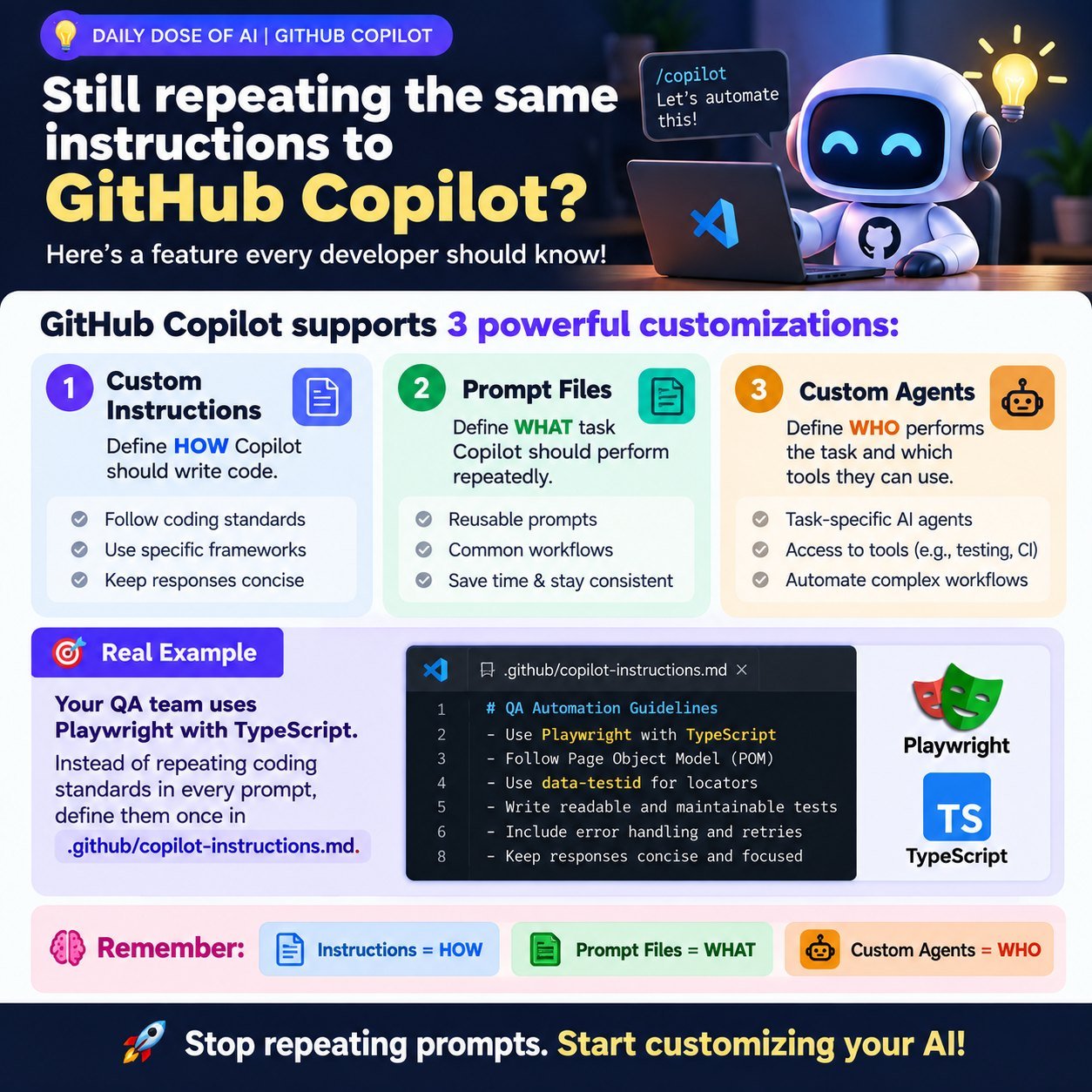
GitHub Copilot has three customisations. Custom Instructions define how Copilot writes code, Prompt Files define what task it performs repeatedly, and Custom Agents define who performs the task and which tools it can use.
Still repeating the same instructions to GitHub Copilot?
Here's a feature every developer should know!
GitHub Copilot supports 3 powerful customizations:
Custom Instructions → Define HOW Copilot should write code.
Prompt Files → Define WHAT task Copilot should perform repeatedly.
Custom Agents → Define WHO performs the task and which tools they can use.
Real Example: Your QA team uses Playwright with TypeScript.Instead of repeating coding standards in every prompt, define them once in .github/copilot-instructions.md.
Remember:Instructions = HOW
Prompt Files = WHAT
Custom Agents = WHO
Stop repeating prompts. Start customizing your AI!
Explore GitHub Copilot ebooks and ebooks on AI here : https://lnkd.in/dyArasuM